Apple Watch Water Tracker: Hydration Tracking from Your Wrist
Over 40% of recent active logging users log from Apple Watch. Logging from your wrist takes about 2 seconds. No ounces to measure, no cups to count.
Last updated: September 2026
Quick answer
An Apple Watch Water Reminder App Without Drink Logging
P is a free iPhone and Apple Watch hydration app built for quick bathroom logging. Instead of entering every drink and estimating its volume, tap P on your wrist on the way to the bathroom. The app shows your pattern and sends reminders based on time since your last logged visit. Compare this with intake tracking.
A different kind of hydration app
Most water trackers ask you to log every glass. P records how often you go to the bathroom instead. Research has found associations between bathroom frequency and hydration markers. A couple of seconds on your wrist, and you’re done.
log from Watch
a visit
or count
Why Track Hydration from Apple Watch?
The biggest challenge with any health tracking habit is consistency. If logging takes effort, you stop doing it. That’s why Apple Watch changes the equation for hydration tracking.
With P on your wrist, you log the visit in a couple of seconds on the way to the bathroom. The visit is recorded, your daily count updates, and your streak stays alive. No phone to pull out, no app to open, no volume to estimate. A study published in BMJ found that patients using electronic diaries achieved 94% compliance vs. only 11% with paper diaries. The easier you make the action, the more reliable your data becomes.
How P Works on Apple Watch
P’s Watch app is designed for the one interaction that matters: logging a bathroom visit as quickly as possible. Here’s what you get on your wrist:
Logging in Seconds
Tap on the way to the bathroom. Your visit is timestamped and synced to your iPhone automatically via iCloud. The fastest possible friction for consistent tracking.
Watch Face Complications
Add P to your watch face to see your current daily count at a glance. Tap the complication to open the app and log instantly. No navigating through the app grid.
Pattern at a Glance
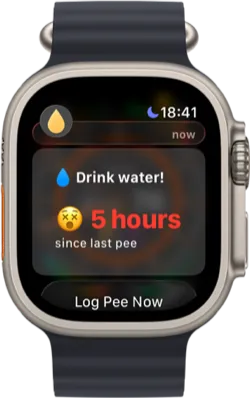
The Watch app shows your current daily count and time since your last logged visit. A quick glance gives you context without claiming to measure hydration status.
Smart Alerts
P can notify you on your wrist based on time since your last logged bathroom visit. A gentle tap on the wrist can be easier to notice than a phone notification.
Why Wrist-Based Tracking Works Better
Traditional hydration apps ask you to log every glass of water from your phone. You have to estimate volumes and remember to pull out your phone every time you drink. That repeated effort can make the habit harder to maintain.
P flips this by tracking output instead of input. You’re already going to the bathroom, so there’s nothing extra to remember. And because your Apple Watch is always on your wrist, logging is literally a flick and a tap.
Research published in the European Journal of Clinical Nutrition found associations between study participants’ bathroom frequency and hydration markers. P uses that research for personal pattern awareness, not as a direct hydration measurement.
Apps like WaterMinder and WaterLlama offer Apple Watch apps, but they still require drink volumes and intake entries. P asks for a few seconds on the way to the bathroom, which can be a better fit for people who dislike intake logging.
Who Benefits from Apple Watch Hydration Tracking?
Apple Watch users who benefit most from wrist-based hydration tracking include:
- Busy professionals who can’t stop to log water intake throughout the day. A wrist tap on the way to the restroom takes no time out of your workflow.
- Athletes and gym-goers who want to stay aware of hydration around workouts without carrying a phone during training.
- People who forget to drink water. A wrist reminder provides another cue during a busy day, including for people exploring ADHD-friendly hydration routines.
- People keeping a voiding diary. If a clinician asks you to record bathroom patterns, Watch logging can make timestamps easier to capture consistently.
- Apple Watch health enthusiasts who already track steps, heart rate, and sleep. P adds low-friction hydration awareness to an existing wellness routine.
The Science Behind the Approach
P’s approach is informed by peer-reviewed research examining bathroom frequency, hydration markers, and the reliability of electronic diaries:
Track Hydration from Your Wrist
P is a free app for iPhone and Apple Watch. Pair your Watch and start logging bathroom visits in seconds. An optional subscription adds notes, voided volume tracking, CSV export, custom reminder timing, and more.

Frequently Asked Questions
Yes. P has a full Apple Watch app with logging in seconds, watch face complications, a daily bathroom count, time-since-last-visit context, and streak tracking. Over 40% of recent active logging users log from Apple Watch. The Watch app syncs automatically with your iPhone via iCloud.
Most water tracking apps on Apple Watch require a drink entry and volume estimate. P takes a different approach: tap your Watch on the way to the bathroom. The log takes about 2 seconds, and P uses the pattern for reminders and personal hydration awareness.
P offers complications for most watch face families. The complication shows your current daily bathroom count and opens the app for instant logging. You can review your pattern and log a visit without navigating through the app grid.
P is fundamentally different from apps like WaterMinder and WaterLlama on Apple Watch. Those apps focus on drink entries and volume amounts. P asks for a few seconds on the way to the bathroom. This lower-friction approach may fit people who do not stick with intake logging. Over 40% of recent active logging users log from Watch. See our full comparison for detailed breakdowns.
No. P works great on iPhone alone. The Apple Watch app is an optional companion that makes logging even faster. Many users start on iPhone and later find Watch logging becomes their primary method. P also supports logging via Home Screen widgets, Lock Screen widgets, and Siri shortcuts on iPhone.
This page summarizes peer-reviewed research for educational purposes. It is not medical advice. Consult a healthcare professional for diagnosis and treatment. Hydration apps are wellness tools, not medical devices.