Apple Watch Water Tracker: Hydration Tracking from Your Wrist
Over 40% of P users track hydration from Apple Watch. One tap on your wrist logs a bathroom visit in about 2 seconds. No ounces to measure, no cups to count.
Last updated: April 2026
A different kind of hydration app
Most water trackers ask you to log every glass. P tracks how often you go to the bathroom instead. Research shows 7+ bathroom visits per day means you’re well-hydrated. One tap on your wrist, and you’re done.
from Watch
a visit
= hydrated
Why Track Hydration from Apple Watch?
The biggest challenge with any health tracking habit is consistency. If logging takes effort, you stop doing it. That’s why Apple Watch changes the equation for hydration tracking.
With P on your wrist, you tap once on the way to the bathroom. The visit is recorded, your daily count updates, and your streak stays alive. No phone to pull out, no app to open, no volume to estimate. A study published in BMJ found that patients using electronic diaries achieved 94% compliance vs. only 11% with paper diaries. The easier you make the action, the more reliable your data becomes.
How P Works on Apple Watch
P’s Watch app is designed for the one interaction that matters: logging a bathroom visit as quickly as possible. Here’s what you get on your wrist:
One-Tap Logging
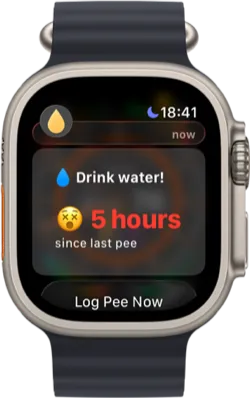
Tap on the way to the bathroom. Your visit is timestamped and synced to your iPhone automatically via iCloud. The fastest possible friction for consistent tracking.
Watch Face Complications
Add P to your watch face to see your current daily count at a glance. Tap the complication to open the app and log instantly. No navigating through the app grid.
Hydration Status
The Watch app shows whether you’re on track for the day based on your bathroom frequency. Green means well-hydrated. A quick glance tells you where you stand.
Smart Alerts
P notifies you on your wrist when you’ve gone too long without a bathroom visit. A gentle tap on the wrist is a more natural reminder than a phone notification.
Why Wrist-Based Tracking Works Better
Traditional hydration apps ask you to log every glass of water from your phone. This creates two problems: you have to estimate volumes (how many ounces was that glass?), and you have to remember to pull out your phone every time you drink. Most people give up within a week.
P flips this by tracking output instead of input. You’re already going to the bathroom, so there’s nothing extra to remember. And because your Apple Watch is always on your wrist, logging is literally a flick and a tap.
Research published in the European Journal of Clinical Nutrition confirmed that well-hydrated individuals average 7±2 bathroom visits per day, while dehydrated individuals average 5±2. This makes bathroom frequency a validated biomarker for hydration status. P uses this science so you don’t have to measure anything.
Apps like WaterMinder and WaterLlama offer Apple Watch apps, but they still require you to log drinks with volume amounts, which means multiple taps and estimation from your wrist. P requires one tap. That difference in friction compounds over weeks and months into dramatically different compliance rates.
Who Benefits from Apple Watch Hydration Tracking?
Apple Watch users who benefit most from wrist-based hydration tracking include:
- Busy professionals who can’t stop to log water intake throughout the day. A wrist tap on the way to the restroom takes no time out of your workflow.
- Athletes and gym-goers who need to monitor hydration around workouts but can’t carry their phone during training. The Watch is always there.
- People who forget to drink water. If you’re someone who reaches evening and realizes you barely drank anything, P’s Watch alerts catch you early. Common among people with ADHD and those on medications that suppress thirst.
- People managing health conditions. Conditions like kidney stones, UTIs, and overactive bladder benefit from consistent tracking. The Watch makes compliance easy enough to sustain long-term.
- Apple Watch health enthusiasts who already track steps, heart rate, and sleep. Adding hydration monitoring completes the picture. P fits naturally into an existing health tracking routine.
The Science Behind the Approach
P’s methodology is grounded in peer-reviewed research. These studies establish bathroom frequency as a practical, non-invasive indicator of hydration and demonstrate why electronic tracking outperforms manual methods:
Track Hydration from Your Wrist
Download P, pair your Apple Watch, and start logging bathroom visits with a single tap. Free to use, with optional P Plus for advanced analytics and insights.

Frequently Asked Questions
Yes. P has a full Apple Watch app with one-tap logging, complications for your watch face, hydration status display, daily count, and streak tracking. Over 40% of P users log bathroom visits from Apple Watch. The Watch app syncs automatically with your iPhone via iCloud.
Most water tracking apps on Apple Watch require you to log every glass manually, which is tedious and inaccurate. P takes a different approach: instead of tracking intake, you tap your Watch on the way to the bathroom. Research shows that bathroom frequency (7+ visits per day) is a validated biomarker for adequate hydration. One tap from your wrist takes about 2 seconds.
P offers complications for most watch face families. The complication shows your current daily bathroom count and hydration status at a glance. Tapping the complication opens the app for instant logging. This means you can check your hydration status and log a visit without navigating through the app grid.
P is fundamentally different from apps like WaterMinder and WaterLlama on Apple Watch. Those apps require you to log every drink with volume amounts, which involves multiple taps and estimation. P requires one tap on the way to the bathroom. This lower friction is why over 40% of P users track from Apple Watch. See our full comparison for detailed breakdowns.
No. P works great on iPhone alone. The Apple Watch app is an optional companion that makes logging even faster. Many users start on iPhone and later find Watch logging becomes their primary method. P also supports logging via Home Screen widgets, Lock Screen widgets, and Siri shortcuts on iPhone.
This page summarizes peer-reviewed research for educational purposes. It is not medical advice. Consult a healthcare professional for diagnosis and treatment. Hydration apps are wellness tools, not medical devices.